From Netalert to Domotz: Understanding Network Monitors and Building My Own
As a Network Engineer, I always wanted a network and service monitoring system that brings all the necessary tools into a single dashboard. Ever since I started self hosting services on my Raspberry Pi, my goal has been to run everything on it. Most tools are open source and available as separate services, but what really fascinated me was a network monitoring solution called Domotz which was previously known as Fingbox.

Both Domotz and Fingbox provide network monitoring through dedicated hardware. By using their own hardware, they can access the network more effectively with custom tools, without worrying about restricted environments. This makes their monitoring far more efficient.
There are many network monitoring applications available. One of them is Netalert which I currently use and built in with feature rich application. It is open source and offers VLAN based network scanning, but it lacks some other features I wanted.
Since Domotz is very popular in the network monitoring space, I wanted to understand what architecture they use internally. After some research, I came across this blog which gives a clear idea of how the device works and what kind of tools and techniques it uses. Interestingly, Domotz hardware shares the same FCC ID as Fingbox.
I also wanted to explore the internal workings of the Domotz box, but their hardware is quite expensive for someone like me. Luckily, they offer a Docker based solution. I ran it on my Raspberry Pi and started tinkering with it. The results were fascinating. Most of the internal tools were open source and easily available on the internet. They managed everything through a Node.js-based application, which is also available in their public repository.
Inside their container, under the /bin directory, I found several familiar tools:

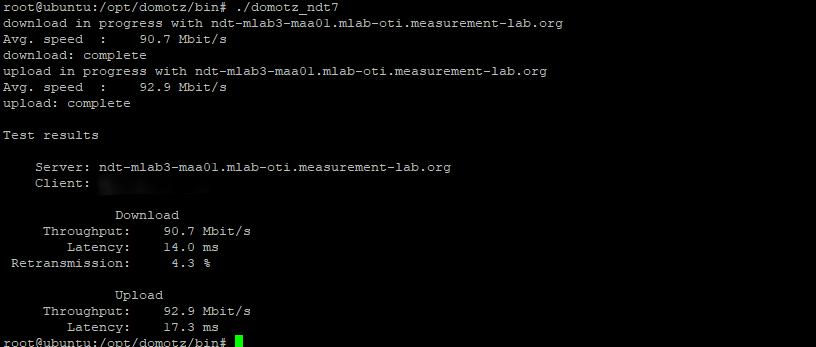
mtrfor traceroute- nd7 from M-LAB for speed tests
digfor DNS testnetstat- SNMP tools like snmpwalk, snmptrap, and net-snmp
nmaparp based device scanningopenvpnfor VPN
Some tools could be executed directly, such as the speed test and mtr traceroute.
Speedtest#
mtr Traceroute#

They also have custom tools that return the default gateway, interface name, MAC address, IP address, and CIDR.
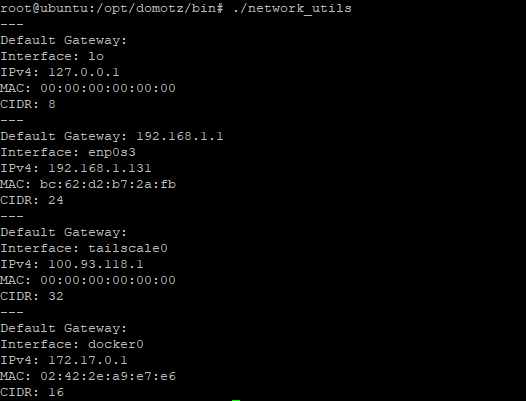
Their custom Node.js code, called domotz-remote-pawn-ng it contains many utilities that help them stand out. Tools such as ip_conflict (detecting duplicate IPs on the LAN), TCP monitor, LAN wakeup, Avahi, Bonjour, NetBIOS, ONVIF(Camera access), UPnP, DHCP server scan, and many more. There are so many folders and tools that listing them all here would make this blog too long.
For secure remote access, Tailscale is more than enough, and I do not need a reverse proxy. Using these devices as inspiration, I want to build my own custom monitoring service using raspberryPI tailored to my personal needs.
:wq for now, until next time.